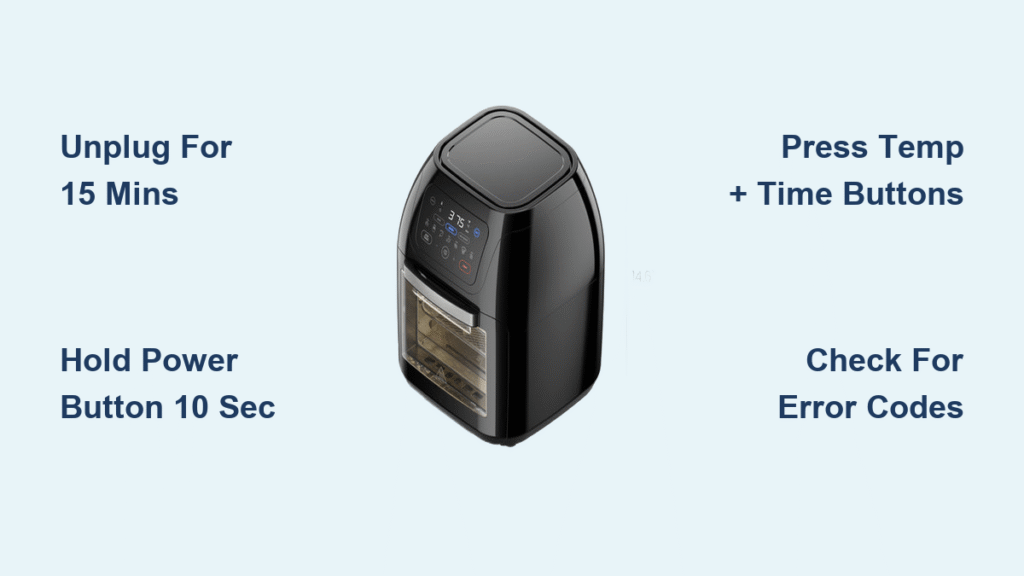
Your Chefman air fryer suddenly stopped responding mid-cook, the display shows cryptic error codes, or it’s just not heating properly. Before panicking about expensive repairs, a simple reset often solves these common issues. This comprehensive guide walks you through every reset method for Chefman air fryers, from basic power cycling to advanced troubleshooting when standard resets fail. You’ll learn exactly how to perform a Chefman air fryer reset in minutes—no technical expertise required.
Most Chefman air fryer problems stem from temporary software glitches rather than hardware failures. A proper reset clears corrupted memory, restores default settings, and gets your appliance back to cooking perfect crispy fries in no time. Whether you own a basic model or a smart WiFi-enabled unit, this guide covers all the reset techniques you need to know.
Basic Reset Method: Power Disconnection
Simple 4-Step Power Cycle
The most effective reset starts with complete power removal. This clears temporary software glitches and restores factory settings without complex procedures.
- Unplug immediately – Remove the power cord from the wall outlet, not just the unit
- Wait 15 minutes minimum – This allows internal capacitors to fully discharge
- Reconnect firmly – Ensure the plug seats completely in the outlet
- Power on and test – Check basic functions before cooking
Why This Works
Your Chefman’s internal computer stores temporary data during operation. Power cycling forces a complete memory refresh, eliminating corrupted settings that cause erratic behavior. This method resolves approximately 80% of operational issues. The 15-minute wait is crucial—it gives time for residual electricity in the circuit board to dissipate completely. Rushing this step by plugging back in too soon often leads to incomplete resets.
Control Panel Reset Options
Digital Display Models
For Chefman air fryers with digital screens, a direct control panel reset offers faster results than power cycling.
Hold power button method:
– Press and hold the power button for 10 seconds
– Watch for all display lights to flash simultaneously
– Release immediately when flashing begins
– Wait 30 seconds for the internal reset cycle to complete
This technique works even when your screen appears frozen. The flashing lights confirm the reset has initiated. If nothing happens after 10 seconds, return to the basic power disconnection method.
Button Combination Tricks
Some models respond to specific button sequences:
Temperature + Time reset:
– Press and hold both the temperature down (-) and time down (-) buttons
– Maintain pressure for 5 seconds until you hear a beep
– The display will flash three times to confirm reset initiation
– Release buttons and allow 60 seconds for completion
Pro tip: This combination works even when the display appears frozen or unresponsive. Many users don’t realize their Chefman air fryer reset can be triggered through button combinations rather than just unplugging.
Reset Indicators: Know When It Worked
Visual Confirmation Signs
Successful resets display clear indicators:
- Display shows 0:00 or OFF – Default settings restored
- All preset programs cleared – Memory wiped clean
- Temperature resets to 350°F – Factory default temperature
- Error codes disappear – No E1, E2, E3, or E4 messages
Quick Function Test
After any reset, perform this 3-minute verification:
1. Set temperature to 350°F
2. Set timer for 3 minutes
3. Press start and listen for normal fan operation
4. Feel for warm air from the vent within 30 seconds
If your Chefman air fryer reset was successful, you should hear the fan activate immediately and feel warm air circulating. No response after this test means you need to try an advanced reset method.
Troubleshooting Failed Resets
Extended Disconnection Method
When standard 15-minute resets fail, try this intensive approach:
Hard reset protocol:
– Unplug the unit and move to a cool, dry location
– Wait 2 full hours for complete system discharge
– Check the power cord for damage or kinks
– Try a different outlet on a different circuit
– Reconnect and test basic functions
This extended waiting period ensures even the deepest memory caches clear completely. Many users report success with this Chefman air fryer reset method when standard approaches fail.
Error Code Solutions
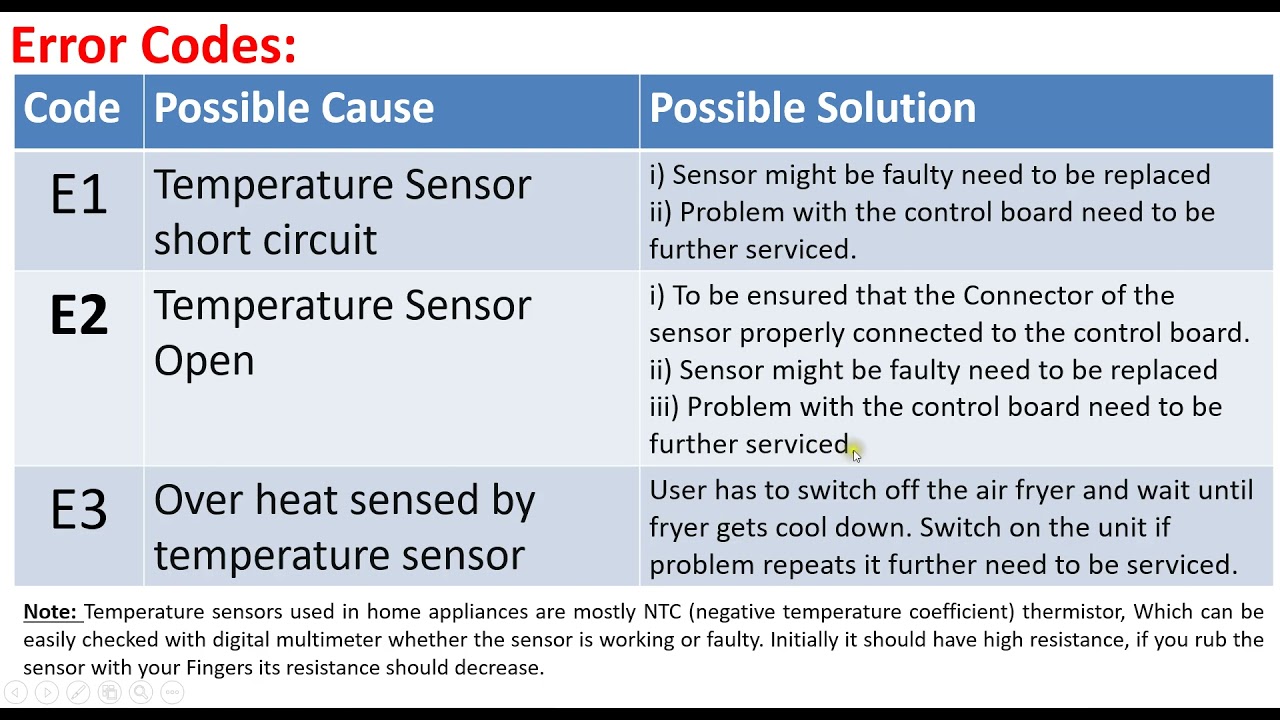
E1 (Temperature sensor error):
– Perform hard reset first
– If code returns, sensor replacement likely needed
– Contact support after third reset attempt
E2 (Overheating protection):
– Ensure 6+ inches clearance around unit
– Clean heating element and fan area
– Reset after 30-minute cool-down
E3 (Fan malfunction):
– Check for food debris blocking fan
– Reset may clear temporary obstructions
– Persistent E3 requires service
E4 (Power supply issues):
– Test outlet with another appliance
– Try different outlet immediately
– Consider voltage stabilizer for areas with power fluctuations
Model-Specific Reset Variations

WiFi-Enabled Models
Smart Chefman air fryers require extra steps:
- Reset clears all network settings
- Reconnect to home WiFi through Chefman app
- Update firmware if prompted
- Re-link to smart home assistants
Note: Some WiFi models retain user profiles after reset, requiring manual deletion. Unlike basic models, your Chefman air fryer reset on smart units will disconnect from your home network, so have your WiFi password ready before initiating the reset.
Analog Dial Models
Traditional dial models offer simplicity:
- No digital memory beyond current settings
- Reset achieved solely through power disconnection
- Knob positions don’t affect reset success
- Manual recalibration required after extended storage
These models rarely need resets beyond the basic power cycle, but if yours requires frequent Chefman air fryer reset procedures, check for underlying electrical issues.
Prevent Future Reset Needs
Daily Maintenance Routine
After each use:
– Empty and clean the basket completely
– Wipe heating element with damp cloth (when cool)
– Check fan area for food particles
– Ensure proper ventilation clearance
Power Protection Strategies
- Install surge protector designed for kitchen appliances
- Unplug during electrical storms
- Avoid sharing outlets with high-draw appliances like microwaves
- Consider whole-house surge protection for frequent power issues
Regular maintenance significantly reduces the need for a Chefman air fryer reset. Most reset requirements stem from poor ventilation or electrical fluctuations rather than appliance defects.
When to Call Support
Red Flags Requiring Expert Help
Contact Chefman customer support immediately if:
– Reset fails after three complete attempts
– Burning smells or unusual sounds occur
– Display remains blank after reset
– Reset frequency exceeds once per month
– Error codes return immediately after reset
Information to Prepare
Before calling support, gather:
– Model and serial numbers (bottom of unit)
– Purchase date and retailer
– Specific error codes displayed
– Number of reset attempts performed
– Description of when issues began
Frequent need for a Chefman air fryer reset could indicate a deeper issue. Support representatives can often diagnose problems over the phone and determine if your unit needs service.
Your Chefman air fryer should provide years of reliable service with minimal resets. When issues do arise, starting with these proven reset methods solves most problems quickly and safely. Remember that frequent resets signal deeper issues requiring professional attention—don’t ignore patterns that suggest your appliance needs more than a simple restart. For persistent problems, contact Chefman support with your reset history to expedite service. With proper care and occasional resets, your air fryer will continue delivering crispy, delicious meals for years to come.